Xero Client Chasing Software: Automate Missing Receipt Requests
If you are shopping for this, you have probably already tried the two obvious things — a spreadsheet of transactions pasted into an email, or Xero’s own Ask queries — and found that both put the work back on the client at exactly the moment they are least willing to do it.
This page sets out what the category should actually do, what Xero gives you for free, and where the remaining gap is. Everything about Xero’s features is taken from Xero Central and Xero’s own product-ideas forum, with the date it was checked.
Short answer
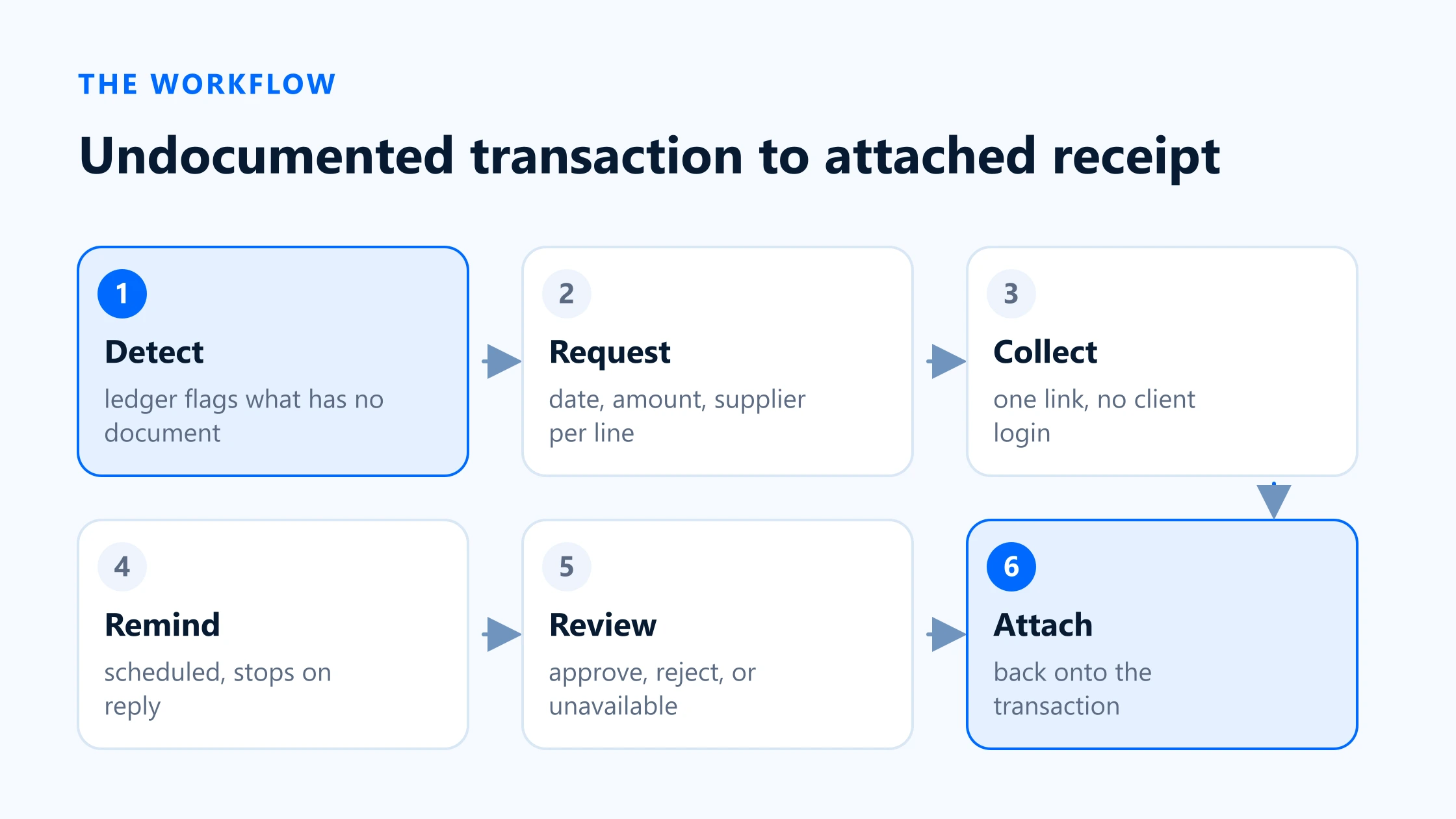
Xero client chasing software should do six things: read your ledger to find posted transactions with nothing attached, turn each one into a request that names the date, amount and supplier, let the client upload without creating a login, remind them automatically on a schedule, give you a review step before anything is accepted, and attach the approved file back onto the original transaction.
Xero itself covers part of this. Ask, in Xero Partner Hub, sends structured queries and takes file attachments, but your client has to log in to Xero to answer, and the queries are questions you write rather than transactions Xero found. Xero has no report that lists transactions without an attachment, and said in December 2025 that one is not on the roadmap. Closing that gap is what a dedicated chasing tool is for.
What Xero client chasing software should do
The phrase covers a wide range of products, from generic form builders to full bookkeeping automation. For the specific job of recovering a receipt that should exist and does not, the workflow has six stages. A tool that skips one of them hands that stage back to you, so it is worth checking each against any shortlist.
Detection: the ledger tells you what is missing
The list of undocumented transactions should come out of Xero, not out of your memory or a manual scan. This is the stage most tools skip entirely, and it is the one that decides whether the rest is accurate. A request built from a real transaction list is complete; one built from “send me anything you have for June” is a guess.
Exact requests: name the transaction, not the month
Each line the client sees should carry the date, amount, supplier or payee, and bank account. That is the difference between a client who recognises the charge instantly and one who has to open their own banking app to work out what you are asking about. It is also what makes a partial reply useful: you know exactly which four of the eleven items are still open.
No-login upload: one link, one action
Every account a client has to create is a place the request can die. A scoped, expiring link that opens straight onto their list — no password, no app — removes the single largest source of drop-off. It has to be genuinely scoped rather than merely unguessable; see the guide to secure no-login upload for the controls that distinguish the two.
Automatic reminders on a cadence you set
Chasing fails when it depends on somebody at the firm remembering to chase. Reminders should fire on a schedule, stop when the item arrives, and escalate in tone rather than repeat the same message. They should also consolidate: one message covering a client’s open items, not one per item.
Review before anything is accepted
Clients send the wrong month, the delivery note instead of the invoice, and a photograph of a receipt with the total cut off. A review step where you approve, reject with a reason, or ask for clarification is the difference between collecting documents and collecting correct documents. Rejection has to reopen the item and tell the client why.
Attachment back onto the original transaction
The document has to end up on the Xero transaction it belongs to, not in a shared folder that somebody then files by hand. Anything short of that leaves you with a second, manual reconciliation between the collection tool and the ledger — which is the job you were trying to remove.
Native Xero options and limits
Xero gives partners two relevant surfaces, and it is worth being precise about what each does before adding anything to the stack.
Ask, in Xero Partner Hub
Ask is Xero’s built-in query tool for practices. Xero Central describes it as “a secure way to request information or documents from your clients”, and it is genuinely useful: you can send the same query to more than one client, save frequent queries as templates, see a Submitted tag when a client replies, and close or reopen a query. Clients can attach up to 100 files per answer, at a maximum of 25 MB each.
Two properties limit it for receipt chasing specifically. The first is access: Xero states that Ask “sends an email to your client whether they’re a Xero user or not”, but that “your client uses a secure login to access and answer your queries” — and if they do not have a login, “they’ll need to create one”. If a client forwards the query to their office manager, that person has to log in and request access, and you then get an email asking you to resend it to them.
The second is origin. An Ask query contains the questions you typed. It is not generated from the transactions in the client’s ledger, so the accuracy of the list is entirely down to how well you compiled it beforehand — which brings you straight back to the detection problem.
No report for transactions without an attachment
There is no Xero report that lists the transactions with nothing attached. This is not an oversight nobody has raised: the request has been open on Xero’s product-ideas forum since August 2023, and in December 2025 a Xero community manager replied that “right now, this isn’t in the teams roadmap”, while saying Xero would keep tracking interest in it.
The practical consequence is that the detection stage has to happen outside the Xero UI. The data itself is available — Xero’s API exposes an attachment flag per transaction, so a connected app can filter on it exactly and cheaply. It is the reporting surface that is missing, not the underlying fact. The detail of what you can and cannot check by hand is worth reading before you commit anyone to a manual monthly scan.
JAX
Xero is also building JAX, described on Xero Central as Xero’s “artificial intelligence (AI) finance partner”. For accountants and bookkeepers it is marked BETAin Xero Partner Hub, and Xero says it is adding functionality over time. As of the date this page was last checked, Xero’s published material does not describe JAX as a client-chasing workflow, so it would be premature to plan around it either way. It is worth re-checking, and this page records the date it was.
| Attribute | Stage | Native Xero |
|---|---|---|
| Detection of undocumented transactions | The ledger produces the list | No report. Requested since 2023; Xero said in December 2025 it is not on the roadmap. The attachment flag exists in the API. |
| Requests naming the exact transaction | Date, amount, payee, account per line | Ask sends the questions you write. Up to 160 questions per query, and query templates can be saved. |
| Upload without a login | One link, no account | No. Xero states the client uses a secure login, and creates one if they do not have it. |
| Automatic reminders | Scheduled, escalating, self-stopping | Manual. Xero Central documents resending a query, not an automatic cadence. |
| Review before acceptance | Approve, reject with reason, reopen | You read the answers and close the query. Reopening is available. |
| Attachment onto the transaction | File lands on the original entry | Files arrive against the query, not against the transaction. Filing them onto entries is manual. |
Detection of undocumented transactions
- Stage
- The ledger produces the list
- Native Xero
- No report. Requested since 2023; Xero said in December 2025 it is not on the roadmap. The attachment flag exists in the API.
Requests naming the exact transaction
- Stage
- Date, amount, payee, account per line
- Native Xero
- Ask sends the questions you write. Up to 160 questions per query, and query templates can be saved.
Upload without a login
- Stage
- One link, no account
- Native Xero
- No. Xero states the client uses a secure login, and creates one if they do not have it.
Automatic reminders
- Stage
- Scheduled, escalating, self-stopping
- Native Xero
- Manual. Xero Central documents resending a query, not an automatic cadence.
Review before acceptance
- Stage
- Approve, reject with reason, reopen
- Native Xero
- You read the answers and close the query. Reopening is available.
Attachment onto the transaction
- Stage
- File lands on the original entry
- Native Xero
- Files arrive against the query, not against the transaction. Filing them onto entries is manual.
The transaction-to-receipt workflow
A transaction-aware workflow inverts the usual order. Instead of asking the client what they have and reconciling it against the ledger afterwards, it starts from the ledger and only ever asks about entries that are genuinely short a document.
This is how BilagPilot works, and the specifics matter more than the description, so here is what actually happens against a Xero organisation.
- Connect. An owner signs in to Xero and approves BilagPilot once. Xero scopes an approval to one organisation, so a practice builds its client list one approval at a time. Nothing syncs until you pick which clients to sync.
- Detect.A scheduled sync reads bank transactions of type Spend, and supplier bills, and uses Xero’s attachment flag to return only the ones with nothing attached. One run covers a year, up to 300 per source. Drafts, deleted and voided entries are skipped, as are transfers between the client’s own accounts and payments settling a bill you already hold — none of those need a separate receipt.
- Request. Each undocumented transaction becomes a line item carrying its date, amount and counterparty. You can add items by hand for anything you know is missing before the ledger does.
- Send. One secure link per client covers every open item, by email or SMS. The client opens it and uploads. There is no account and no password.
- Remind. Reminders go out automatically on a cadence you set, grouped per client, and stop for items that have arrived.
- Review. Nothing reaches Xero unreviewed. You approve, reject with a reason that reopens the item and tells the client, or mark an item as genuinely unavailable so the file shows you asked.
- File back. The approved document is attached to the bank transaction or bill it belongs to, and is visible in Xero straight away. Xero holds up to ten attachments per transaction at 10 MB each; a transaction already carrying ten is refused with that reason rather than failing silently.
Is BilagPilot right for your firm?
BilagPilot is narrow on purpose. It recovers missing documents and files them back. That focus is the reason it does the job well and also the reason it is the wrong purchase for a good number of firms.
Good fit for BilagPilot
- You run bookkeeping or VAT compliance work at volume, and the same clients are short the same kind of paperwork every period.
- Your clients are not going to log in to anything. Sole traders, trades, hospitality, landlords — anyone for whom a password reset ends the conversation.
- You want a review gate you cannot skip, because you are the one signing off the file.
- You need the audit trail: who was asked, when, how many times, and what they said when a receipt genuinely did not exist.
Poor fit for BilagPilot
- You need data capture and coding, not recovery. If the documents already arrive and the problem is keying them in, buy a capture tool.
- Your collection problem is onboarding packs, year-end questionnaires or signatures rather than transaction-level receipts — a general request builder like Content Snare fits that better.
- You are on a ledger we do not support, or you need the Xero connection to be generally available today rather than in pilot.
If you are still weighing it up, the honest test is arithmetic rather than features. Work out what the chasing costs you now with the cost calculator, then run a two-week trial on your five worst clients and compare. If it does not clear the break-even, do not buy it.
Sources
Everything on this page that describes another company’s product, or a rule set by HMRC, comes from that organisation’s own published material. Each entry below records the date this page last checked it, because these change without notice.
- Ask in Xero Partner Hub
Xero Central · checked 17 August 2026
- Send and review Ask queries
Xero Central · checked 17 August 2026
- JAX for accountants and bookkeepers (BETA)
Xero Central · checked 17 August 2026
- Reports — Generate a report for transactions without receipts attached (Xero response, 8 December 2025)
Xero Product Ideas · checked 17 August 2026
- BilagPilot integrations: what each ledger supports
BilagPilot · checked 17 August 2026
Keep reading
How to Find Xero Transactions Without Attachments
The manual routes through the Xero UI, why they stop working at scale, and what the API exposes that the reports do not.
Read itHow to Automate Client Document Requests in Xero
The step-by-step SOP: building the list, wording the request, setting the cadence and handling the awkward replies.
Read itBilagPilot vs Xero Ask
A direct feature-by-feature comparison, including the cases where Ask is the better tool and you should not buy anything.
Read itMissing Receipt Chasing Cost Calculator
Put your own numbers in and see what the chasing currently costs, and what a tool would have to save to break even.
Read itSee your Xero clients' undocumented transactions in one list
Connect a Xero organisation, let BilagPilot read the attachment flag on every posted spend transaction and bill, and send one link per client. Approved documents go back onto the transaction they belong to.
No card required. Nothing is charged automatically.