Client Document Collection Software for Accountants: Tools Compared by Workflow
Eight tools, compared on the nine things that decide whether a workflow survives contact with a real client base. Every claim links to the vendor’s own documentation, pricing page or app-store listing, with the date it was checked.
There are no scores and no stars here. We sell one of these products, so a number from us would not mean anything.
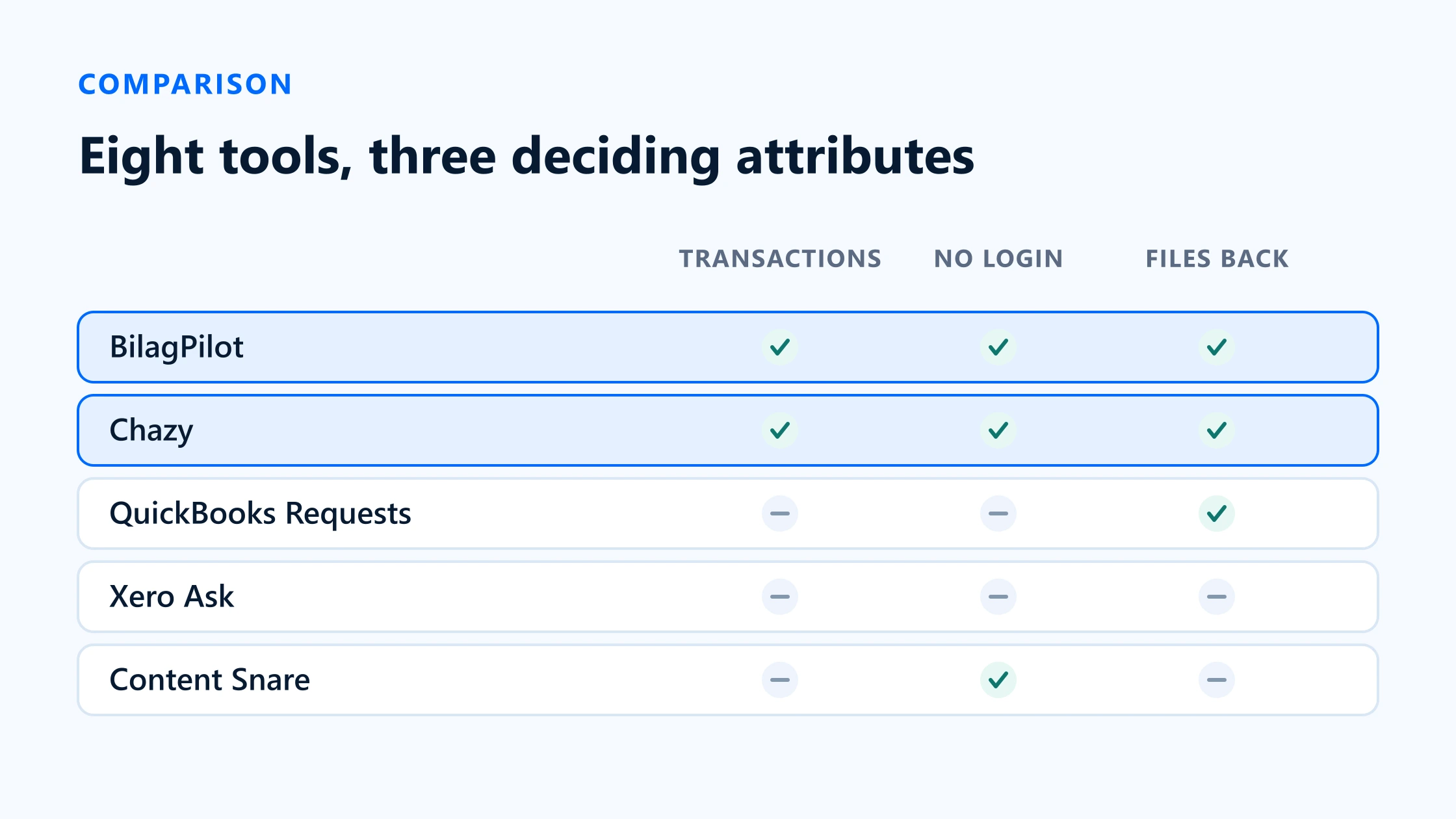
Short answer
The tools accountants shortlist for this fall into four groups, and the group matters more than the brand. Transaction-aware chasing (BilagPilot, Chazy) builds the request from the ledger and files the document back onto the transaction. General collection (Content Snare) builds it from a template you wrote and is far more flexible about what it can ask for. Native tools (Xero Ask, QuickBooks Requests) cost nothing extra and require a client login. Adjacent platforms (Apron, Dext, Karbon) do payments, capture or practice management, with document requests as a side feature.
Two attributes separate them more than any other: whether the tool can see your ledger’s transactions, and whether your client has to create an account. Get those two right for your client base and the rest is detail.
What the software should solve
Before comparing anything, be specific about the failure you are buying your way out of. Document collection breaks in five distinct places, and most tools fix two or three of them.
- Nobody knows what is missing. The list has to be produced by hand every period, which costs time before a single client has been contacted.
- The request is too vague to act on.“Send anything outstanding for Q1” asks the client to do the reconciliation.
- The client cannot get in. A portal invitation and a password reset is where a large share of requests quietly die.
- Nobody chases. Follow-up depends on a person remembering, so it happens in bursts and stops during busy season — which is when it matters.
- What arrives has to be filed by hand. The documents land in a folder or an inbox, and someone attaches them to transactions afterwards. That is a second reconciliation you did not have before.
Main software categories
| Attribute | Sees your transactions | Client needs a login | Files back onto the transaction |
|---|---|---|---|
| BilagPilot | Yes | No | Yes |
| Chazy | Yes (Xero) | No — email or WhatsApp | Yes (Xero) |
| QuickBooks Requests | Bank transactions only | Yes — free Intuit account | Yes, natively |
| Xero Ask | No | Yes — Xero login | No — files sit against the query |
| Content Snare | No | No | No — storage and exports |
| Dext | Bank feeds and matching | App, email or WhatsApp | Publishes coded entries |
| Apron | Two-way bill and payment sync | Works inside Apron | Two-way sync |
| Karbon | No — contacts and invoices only | Client-facing workflow | No |
BilagPilot
- Sees your transactions
- Yes
- Client needs a login
- No
- Files back onto the transaction
- Yes
Chazy
- Sees your transactions
- Yes (Xero)
- Client needs a login
- No — email or WhatsApp
- Files back onto the transaction
- Yes (Xero)
QuickBooks Requests
- Sees your transactions
- Bank transactions only
- Client needs a login
- Yes — free Intuit account
- Files back onto the transaction
- Yes, natively
Xero Ask
- Sees your transactions
- No
- Client needs a login
- Yes — Xero login
- Files back onto the transaction
- No — files sit against the query
Content Snare
- Sees your transactions
- No
- Client needs a login
- No
- Files back onto the transaction
- No — storage and exports
Dext
- Sees your transactions
- Bank feeds and matching
- Client needs a login
- App, email or WhatsApp
- Files back onto the transaction
- Publishes coded entries
Apron
- Sees your transactions
- Two-way bill and payment sync
- Client needs a login
- Works inside Apron
- Files back onto the transaction
- Two-way sync
Karbon
- Sees your transactions
- No — contacts and invoices only
- Client needs a login
- Client-facing workflow
- Files back onto the transaction
- No
Read that table by column rather than by row. If the middle column is what kills your requests, four of these eight are off the list immediately, regardless of anything else they do.
Current tools compared
BilagPilot
- Category
- Transaction-aware chasing
- Transaction-aware
- Yes. Scheduled sync finds posted transactions with nothing attached, per ledger.
- Client login
- No. A scoped, expiring link, one per client, covering every open item.
- Reminders
- Automatic, escalating, consolidated per client, stop on response. Email and SMS.
- Review
- Mandatory. Approve, reject with a reason that reopens the item, or mark unavailable.
- Returns to the ledger
- Attaches the approved file to the original transaction in the ledger.
- Integrations
- QuickBooks Online, Xero, Sage Accounting, FreeAgent. Sage is generally available; the other three are in pilot as of 17 August 2026.
- AI, OCR and posting
- AI-assisted document review identifies relevant information, suggests matches and flags problems.
- Price
- Subscription. 14-day trial, no card required.
- Best fit
- Recurring bookkeeping and VAT work where the same clients are short the same paperwork every period.
- Poor fit
- Onboarding packs, signatures, ID and anything that is not a ledger transaction.
Content Snare
- Category
- General collection
- Transaction-aware
- No. You build the request from a template.
- Client login
- No. Content Snare states clients do not need to create an account.
- Reminders
- Automated, unlimited on every plan. SMS allowance per tier.
- Review
- Item-level. You can reject individual items with comments rather than the whole submission.
- Returns to the ledger
- No ledger file-back. Exports and syncs to Google Drive, Dropbox, OneDrive and SharePoint.
- Integrations
- Zapier, Make, webhooks, API, cloud storage, Xero Practice Manager and FYI (client import), FuseSign and Annature for signatures. QuickBooks is not on the list.
- AI, OCR and posting
- None. It collects; it does not read or code documents.
- Price
- From $35/month billed annually (20 active requests, 2 users) up to $215+/month. 14-day free trial, no card.
- Best fit
- Onboarding packs, year-end questionnaires, and any structured request that is not transaction-level.
- Poor fit
- Knowing what to ask for. It cannot see the ledger, so the list is only as good as your template.
Xero Ask
- Category
- Native to Xero
- Transaction-aware
- No. A query contains the questions you typed.
- Client login
- Yes. Xero states the client uses a secure login, and creates one if they do not have it.
- Reminders
- Manual. Xero documents resending a query, not a cadence.
- Review
- You read the answers, then close or reopen the query.
- Returns to the ledger
- Files arrive against the query. Attaching them to transactions is manual.
- Integrations
- Xero only, via Xero Partner Hub.
- AI, OCR and posting
- None in Ask itself.
- Price
- Included for Xero partners.
- Best fit
- Practices already deep in Xero whose clients are comfortable logging in. Up to 160 questions per query, and templates.
- Poor fit
- Clients who will not create a login, and any workflow that needs the list to come from the ledger.
QuickBooks Requests
- Category
- Native to QuickBooks
- Transaction-aware
- Partly. Started from bank transactions, with an AI suggestion when QuickBooks thinks more information is needed.
- Client login
- Yes. A free Intuit account, including for contacts you add who have no QuickBooks access.
- Reminders
- Manual resend. Intuit Intelligence follows up on the content of a reply, not on silence.
- Review
- You mark a request complete, or reopen it to continue.
- Returns to the ledger
- Natively. The file lands in the transaction's Files section.
- Integrations
- QuickBooks only.
- AI, OCR and posting
- Intuit Intelligence checks replies, asks follow-ups, and suggests categorisation.
- Price
- Included in all QuickBooks Online plans, QuickBooks Ledger and Intuit Accountant Suite. Not in Solopreneur.
- Best fit
- QuickBooks-only practices with clients happy in the Client Portal. Genuinely capable and costs nothing extra.
- Poor fit
- Bills and journals rather than bank feed items, cross-client queues, and clients who will not sign in.
Apron
- Category
- Payments and capture
- Transaction-aware
- Not for chasing. Its Xero integration is a two-way sync of bills, payments, contacts and accounts.
- Client login
- Approvers and payers work inside Apron.
- Reminders
- Built around approval and payment flows, not document chasing.
- Review
- Approval workflows for invoices and payments.
- Returns to the ledger
- Two-way sync with Xero; live payment reconciliation.
- Integrations
- Xero. Listed on the Xero App Store for the United Kingdom only.
- AI, OCR and posting
- AI extracts invoice details; validates account details before paying; free payroll payments.
- Price
- Not published on the Xero App Store listing.
- Best fit
- Firms whose real problem is accounts payable — sorting, approving and paying supplier invoices for many clients.
- Poor fit
- Recovering a receipt that does not exist yet. That is not what it is built for.
Chazy
- Category
- Transaction-aware chasing
- Transaction-aware
- Yes. Identifies unreconciled transactions in Xero across all connected bank accounts, and can chase any status including reconciled.
- Client login
- Collects via email or WhatsApp.
- Reminders
- Intelligent reminders that adapt as the deadline approaches, sent automatically.
- Review
- Optional. AI can approve or reject compliant documents automatically, or you keep full control.
- Returns to the ledger
- Pushes collected documents back into Xero as Files, Bills or Invoices automatically.
- Integrations
- Xero. Listed on the Xero App Store for the United Kingdom only, since January 2026.
- AI, OCR and posting
- OCR extraction, compliance and fraud-risk checks against UK invoicing requirements, custom validation rules.
- Price
- Free for the first month, no card. Pay-as-you-go thereafter, with the breakdown given on a demo call.
- Best fit
- UK Xero practices that want maximum automation and are comfortable letting AI clear compliant documents.
- Poor fit
- Multi-ledger practices, and firms that require a human decision on every document before it reaches the ledger.
Dext
- Category
- Capture
- Transaction-aware
- Bank feeds and bank match, but the product starts from documents, not from gaps.
- Client login
- Clients submit by app, email, WhatsApp or upload.
- Reminders
- A missing paperwork request feature is listed in the practice plan.
- Review
- You review and approve before anything is published.
- Returns to the ledger
- Publishes coded entries to Xero. Deep two-way sync including bank transactions, purchase orders and tax rates.
- Integrations
- Xero plus 30+ other accounting systems. Listed in 13 country groupings.
- AI, OCR and posting
- The whole point: extraction, line items, supplier rules, duplicate detection, auto-publish. Dext claims 99.9% data accuracy.
- Price
- Business plan from 5 users and 250 documents; practice plan from 10 clients. 14-day free trial.
- Best fit
- Firms whose bottleneck is keying documents that already arrive. The category leader by a distance.
- Poor fit
- Being your primary answer to clients who send nothing at all.
Karbon
- Category
- Practice management portal
- Transaction-aware
- No. Its Xero integration syncs client contacts and invoices, not transactions.
- Client login
- Client collaboration runs through Karbon's client-facing workflow.
- Reminders
- Part of its workflow and client communication features.
- Review
- Work management rather than document-level approval.
- Returns to the ledger
- Invoices push to Xero. No document file-back onto transactions.
- Integrations
- Xero, open API, data warehouse. Listed in 13 country groupings, in English and French.
- AI, OCR and posting
- Email management, workflow, CRM, capacity planning, billing, business intelligence and generative AI.
- Price
- Not published on the Xero App Store listing.
- Best fit
- Running the whole practice — jobs, deadlines, email and capacity — with client requests as one part of it.
- Poor fit
- Being a receipt-chasing tool. That is a small corner of a much larger product.
Best fit by practice type
Sole practitioner, under 30 clients, one ledger
Use the native tool. Xero Ask or QuickBooks Requests is genuinely enough at this size, and both are already paid for. Revisit when the manual detection scan starts eating a full day a month.
Bookkeeping-heavy practice, 30–150 clients, mostly one ledger
This is where transaction-aware chasing pays for itself, because the detection step has become a real cost and the same clients fail every month. If you are UK Xero-only and want maximum automation, look hard at Chazy. If you work across ledgers or require a human decision on every document, BilagPilot.
Multi-ledger practice
Native tools stop working as a strategy here — you get one queue per platform. Only a cross-ledger tool gives you a single list. BilagPilot covers QuickBooks Online, Xero, Sage Accounting and FreeAgent; Dext covers more ledgers but is solving the capture problem, not the chasing one.
Advisory or tax-led practice
Your collection problem is probably not transaction-level at all. It is engagement letters, ID, prior-year information and questionnaires. Content Snare, or the request features in a practice-management platform like Karbon, will serve you far better than anything transaction-aware.
Practice with a serious accounts-payable workload
Apron and Dext are solving your problem; chasing tools are not. Approving and paying supplier invoices across many clients is a different discipline, and the tools built for it are much better at it than a collection tool with a payments feature bolted on.
Run a two-week test
Demos are designed to look good. A two-week test on your own worst clients is the only comparison that means anything, and every tool here has either a free trial or a demo you can scope this way.
Pick five clients, not your best ones
Choose the five who cost you the most chasing time last quarter. A tool that works on your compliant clients has proved nothing.
Record the baseline first
Before you switch anything on, write down for the last completed period: items requested, rounds sent, completion rate, days to complete, and staff minutes spent. Without this you will have opinions instead of evidence. The cost calculator gives you the money figure from those inputs.
Run one period end to end
Detection, request, reminders, review, file-back. Do not stop at “the client uploaded something” — the filing step is where several of these tools stop and your staff start.
Count the same five numbers again
Compare like for like. Rounds per completed request is the most responsive of the five and the best early signal.
Ask the clients
Two questions: was it clear what you needed, and was it easy to send? A tool your clients dislike will be quietly abandoned by your staff within a quarter, whatever the numbers say.
Decide against the break-even, not the feature list
If the saved minutes do not clear the subscription cost at your own hourly rate, do not buy it — including if the tool in question is ours.
Sources
Everything on this page that describes another company’s product, or a rule set by HMRC, comes from that organisation’s own published material. Each entry below records the date this page last checked it, because these change without notice.
- Content Snare pricing — plans, active requests, users, storage, SMS
Content Snare · checked 17 August 2026
- Content Snare integrations — the full published list
Content Snare · checked 17 August 2026
- Ask in Xero Partner Hub — login requirement, attachments, roles
Xero Central · checked 17 August 2026
- Request more information on a transaction (updated 5 August 2026)
Intuit QuickBooks Support · checked 17 August 2026
- Apron on the Xero App Store — two-way sync, payments, UK listing
Xero App Store · checked 17 August 2026
- Chazy on the Xero App Store — unreconciled transactions, reminders, OCR, delivery to Xero, pricing
Xero App Store · checked 17 August 2026
- Dext on the Xero App Store — capture channels, missing paperwork request, plans
Xero App Store · checked 17 August 2026
- Karbon on the Xero App Store — what the Xero integration syncs
Xero App Store · checked 17 August 2026
- BilagPilot integrations and readiness by ledger
BilagPilot · checked 17 August 2026
Keep reading
Capture Tools vs Chasing Tools
The framework behind these categories, and a decision tree that ends in a category rather than a product.
Read itBilagPilot vs Content Snare
The two head-to-head in detail, including the several cases where Content Snare is the better buy.
Read itBilagPilot vs Chazy
The closest comparison on this site: both transaction-aware, very different views on how much AI should decide.
Read itMissing Receipt Chasing Cost Calculator
Set a budget before you shortlist. What the chasing costs now, and what a tool has to save to break even.
Read itTest the transaction-aware end of this list
If your bottleneck is that nobody knows what is missing until somebody scans for it, that is the one category on this page that fixes it. Connect a ledger, get the list, and see how many rounds it takes.
No card required. Nothing is charged automatically.