How to Chase Clients for Missing Records Without Endless Emails
Most firms have already tried sending more reminders, and found that it produces more irritation rather than more documents. The problem is almost never frequency. It is that the message is not actionable, and that the exceptions have nowhere to go.
This page is the reasoning and the numbers. If you want the messages themselves, the template generator writes all five with your details filled in.
Short answer
Generic reminders fail because they hand the reconciliation back to the client. “Please send anything outstanding for Q1” requires them to work out what is missing — which is your job, and which they will not do.
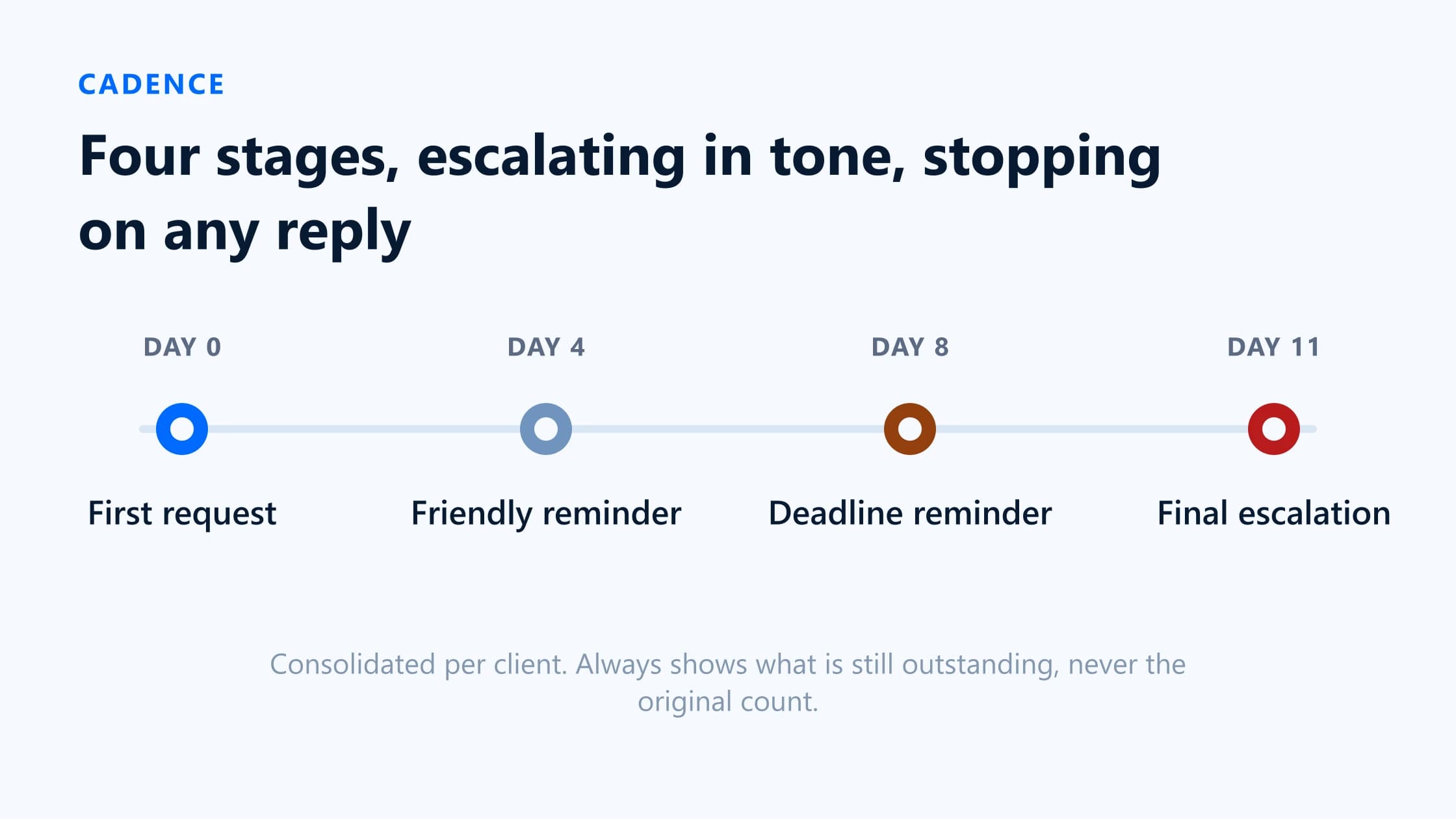
The fix has three parts. Name the exact transactions so each line can be recognised in two seconds. Run a staged cadence that escalates in tone, stops on any response, and never depends on somebody remembering to send it. Model the exceptions — partial, wrong, unavailable — as real states rather than as silence. Then measure six numbers so you can tell whether it is working.
Why generic reminders fail
Four distinct failure modes, and they compound. Recognising which one you have determines what to change.
- The message asks the client to do your reconciliation. They have to open their banking app, work out which payments you might mean, and guess. Faced with that, the rational response is to deal with it later, and later never arrives.
- It arrives with no way to act immediately. If responding means finding a password, or replying to an email with attachments from a phone, the task moves from two minutes to a job that needs a desk.
- It ignores what they already sent. A client who supplied six of eleven and receives a reminder saying eleven concludes you are not reading their replies. That is the message that ends cooperation.
- There is no route for “I don’t have it”. If the only possible response is uploading a file, the client with no file says nothing — and you cannot distinguish them from a client who is ignoring you.
Name the exact missing transactions
The single highest-leverage change is replacing a period with a list. Compare these two requests for the same underlying work:
| Attribute | Generic | Transaction-level |
|---|---|---|
| What the client reads | "Please send any outstanding receipts and invoices for Q1." | "11 payments need paperwork. £248.00 to SCREWFIX on 3 June, £1,120.00 to ADOBE on 7 June…" |
| What they have to do first | Open their bank, reconstruct three months, guess what you hold. | Recognise a name and a number. |
| What a partial reply means | Unknown. You compare and ask again. | Four of eleven left, named. |
| What the next reminder says | The same thing again. | Only the four that are still open. |
| Where the list comes from | Your memory. | The ledger. |
What the client reads
- Generic
- "Please send any outstanding receipts and invoices for Q1."
- Transaction-level
- "11 payments need paperwork. £248.00 to SCREWFIX on 3 June, £1,120.00 to ADOBE on 7 June…"
What they have to do first
- Generic
- Open their bank, reconstruct three months, guess what you hold.
- Transaction-level
- Recognise a name and a number.
What a partial reply means
- Generic
- Unknown. You compare and ask again.
- Transaction-level
- Four of eleven left, named.
What the next reminder says
- Generic
- The same thing again.
- Transaction-level
- Only the four that are still open.
Where the list comes from
- Generic
- Your memory.
- Transaction-level
- The ledger.
What each line needs
- Date, as it appears on their statement.
- Amount, with the currency symbol.
- Payee exactly as the bank feed rendered it, including the ugly card-descriptor version — that string is what they will recognise.
- Which account, if the client has more than one.
- What you need: a VAT invoice, a receipt, or just an explanation.
Use a staged cadence and handle exceptions
The cadence
| Attribute | When | Tone | What changes |
|---|---|---|---|
| 1. First request | Day 0 | Neutral | Count, deadline, link. No apology and no explanation of why you need them. |
| 2. Friendly reminder | Day 4–5 | Light — assumes it was missed | The remaining count, not the original. Same link. |
| 3. Deadline reminder | 2 working days before the deadline | Direct | States the consequence: the work moves to next month, or the return goes in without it. |
| 4. Final escalation | 1–2 days after the deadline | Formal, on the record | Copies the decision-maker. Offers the 'no receipt exists' route explicitly. |
1. First request
- When
- Day 0
- Tone
- Neutral
- What changes
- Count, deadline, link. No apology and no explanation of why you need them.
2. Friendly reminder
- When
- Day 4–5
- Tone
- Light — assumes it was missed
- What changes
- The remaining count, not the original. Same link.
3. Deadline reminder
- When
- 2 working days before the deadline
- Tone
- Direct
- What changes
- States the consequence: the work moves to next month, or the return goes in without it.
4. Final escalation
- When
- 1–2 days after the deadline
- Tone
- Formal, on the record
- What changes
- Copies the decision-maker. Offers the 'no receipt exists' route explicitly.
Three rules that keep it from becoming corrosive
- Consolidate. One message per client per stage, never one per item. Eleven separate emails is not eleven times as effective; it is one client who mutes you.
- Show progress. Always reference what has arrived. It signals that somebody is paying attention, and it makes the remaining task look small.
- Stop on any response.Including “next week”. A reminder that fires after the client has replied costs more goodwill than one that arrives late.
The exception states
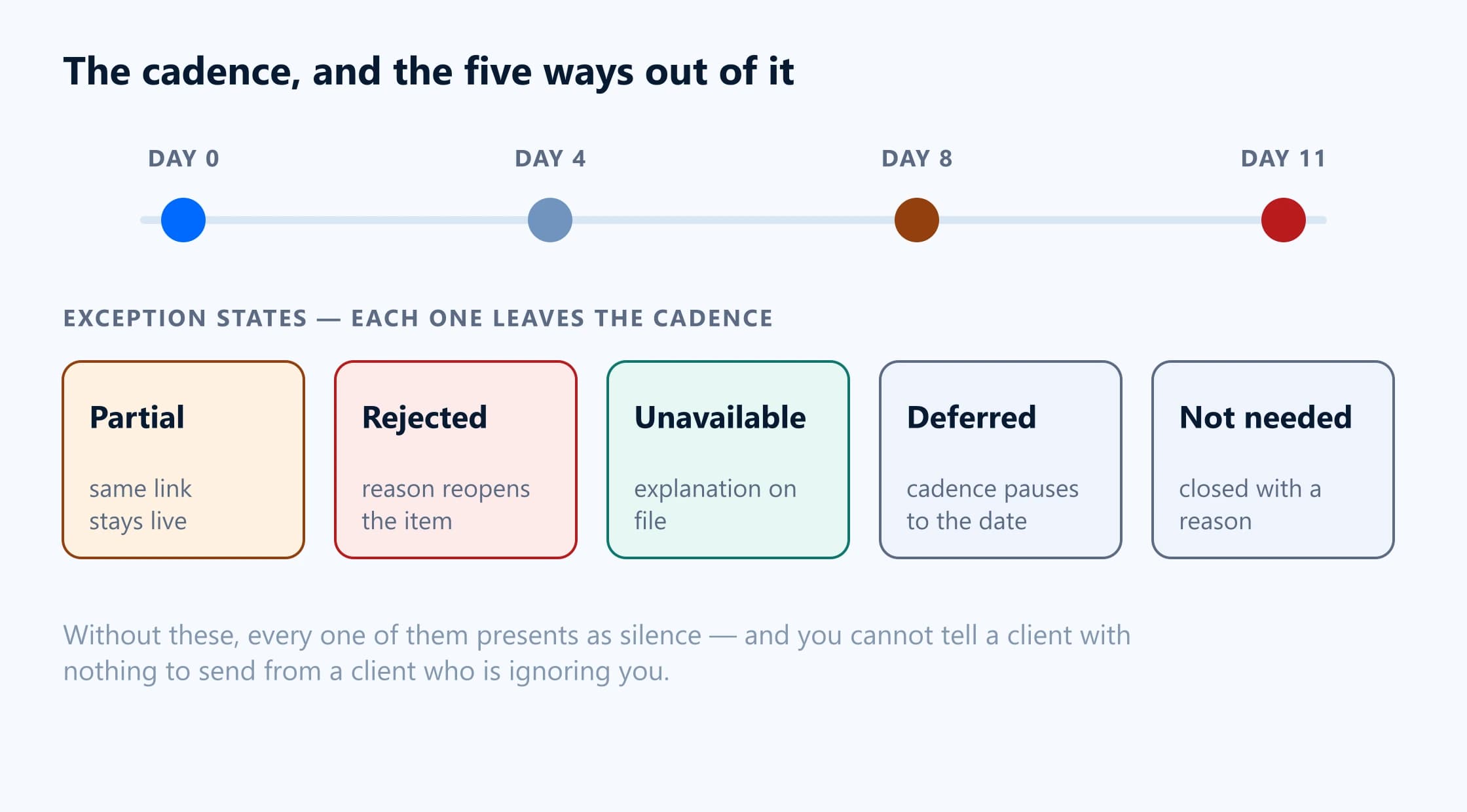
A request has more outcomes than done and not done. Model these five explicitly, or they will all present as silence.
Partial — some items answered
The request stays open, the same link keeps working, and the next reminder names only what is left. Never issue a new link for this: the client will re-upload what they already sent.
Wrong or unreadable — rejected with a reason
The rejection has to reach the client with the reason, and the item has to reopen so it re-enters the cadence. “This is the delivery note, we need the invoice showing the VAT” gets the right file. “Rejected” gets the same file again.
Unavailable — the document does not exist
A legitimate outcome. Capture what the payment was for in the client’s own words, against the item, dated. The item closes and the period can complete honestly. How the entry is then treated is a matter for your professional judgement — the workflow’s job is to record that you asked and what they said.
Deferred — a promise with a date
“I’ll do it Friday” should pause the cadence until Saturday, not stop it permanently and not be ignored. A tool that cannot represent this will either nag through the promise or lose the item.
Not needed — you were wrong to ask
Transfers, bill payments and bank charges get onto lists they should not be on. Closing an item as not needed, with a reason, keeps the completion figures honest and stops the same false positive recurring next month.
Measure the workflow
Six numbers. Track them per client and in aggregate, monthly. The point is not the absolute values — they vary enormously by client base — but the direction after you change something.
| Attribute | Definition | What it tells you | If it is bad |
|---|---|---|---|
| Open rate | Requests where the client opened the link, over requests sent. | Whether your message reaches a human at all. Isolates deliverability and subject lines from everything downstream. | Check the address, check spam, try SMS. Nothing else matters until this is healthy. |
| Upload rate | Requests where at least one file arrived, over requests opened. | Whether the ask is actionable. A high open rate with a low upload rate means the request is clear enough to read but not to answer. | Name the transactions. Check the page works on a phone. |
| Completion rate | Requests where every item is approved or closed as unavailable, over requests sent. | The end-to-end result. The number to report. | Look at which items stall. It is usually one category of spend. |
| Overdue rate | Requests past their deadline and still open, at a point in time. | Whether your deadlines are real. A consistently high figure means the deadline is decorative. | Move the deadline earlier and state a consequence, or accept the real one. |
| Rounds per completed request | Messages sent, over requests completed. Count every email and SMS. | The most responsive metric to wording and cadence changes, and the one that maps directly onto staff time. | Fix the first request. Almost all of the excess is caused there. |
| Staff minutes per client per period | Total time on detection, sending, chasing, reviewing and filing, over clients. | What the whole thing actually costs. The only metric a partner will care about. | Find which of the five stages holds the time. It is usually detection or filing, not chasing. |
Open rate
- Definition
- Requests where the client opened the link, over requests sent.
- What it tells you
- Whether your message reaches a human at all. Isolates deliverability and subject lines from everything downstream.
- If it is bad
- Check the address, check spam, try SMS. Nothing else matters until this is healthy.
Upload rate
- Definition
- Requests where at least one file arrived, over requests opened.
- What it tells you
- Whether the ask is actionable. A high open rate with a low upload rate means the request is clear enough to read but not to answer.
- If it is bad
- Name the transactions. Check the page works on a phone.
Completion rate
- Definition
- Requests where every item is approved or closed as unavailable, over requests sent.
- What it tells you
- The end-to-end result. The number to report.
- If it is bad
- Look at which items stall. It is usually one category of spend.
Overdue rate
- Definition
- Requests past their deadline and still open, at a point in time.
- What it tells you
- Whether your deadlines are real. A consistently high figure means the deadline is decorative.
- If it is bad
- Move the deadline earlier and state a consequence, or accept the real one.
Rounds per completed request
- Definition
- Messages sent, over requests completed. Count every email and SMS.
- What it tells you
- The most responsive metric to wording and cadence changes, and the one that maps directly onto staff time.
- If it is bad
- Fix the first request. Almost all of the excess is caused there.
Staff minutes per client per period
- Definition
- Total time on detection, sending, chasing, reviewing and filing, over clients.
- What it tells you
- What the whole thing actually costs. The only metric a partner will care about.
- If it is bad
- Find which of the five stages holds the time. It is usually detection or filing, not chasing.
A realistic target
For a monthly bookkeeping cycle with a client base that is not unusually difficult, a workflow that is working looks roughly like: most requests opened within two working days, the majority of items arriving before the second reminder, two to three rounds per completed request, and completion by the end of the following week. If you are at five or six rounds, the gain from fixing the first request is larger than the gain from any tool.
Sources
Everything on this page that describes another company’s product, or a rule set by HMRC, comes from that organisation’s own published material. Each entry below records the date this page last checked it, because these change without notice.
- BilagPilot: request states, reminder cadence, exception handling and the activity log
BilagPilot · checked 17 August 2026
- BilagPilot security: what is logged for requests, link opens, uploads and reminders
BilagPilot · checked 17 August 2026
- Ask in Xero Partner Hub — the native alternative and how its query tracking works
Xero Central · checked 17 August 2026
Keep reading
Missing Receipt Reminder Email Templates
The five messages in this cadence, generated with your firm, client, period, deadline and link. Includes SMS versions.
Read itMissing Receipt Chasing Cost Calculator
Turn the metrics below into money: monthly and annual cost, savings and a break-even point.
Read itHow to Automate Client Document Requests in Xero
The same cadence as a working SOP against a specific ledger, with the monthly checklist.
Read itSecure Client Document Upload Without Login
Why the transaction detail belongs behind a scoped link rather than in the body of the reminder.
Read itStop being the reason the chase happens
BilagPilot builds the list from the ledger, names every transaction in the request, runs the cadence on a schedule, and records every open, upload, reminder and decision. The six metrics above come out of it rather than out of a spreadsheet.
No card required. Nothing is charged automatically.